
Connecting cogsworth and COMPAS#
By default, cogsworth uses the COSMIC binary population synthesis code to perform binary stellar evolution. However, it is also possible to use the COMPAS code instead. This tutorial will guide you through the steps required to set up cogsworth to use COMPAS for binary population synthesis.
Learning Goals#
By the end of this tutorial you should know how to:
Run a simulation using
COMPASfor binary population synthesisPost-process a pre-run
COMPASsimulation withcogsworthConvert back and forth between
PopulationandCOMPASPopulationobjects
[1]:
import cogsworth
import matplotlib.pyplot as plt
import numpy as np
import pandas as pd
import astropy.units as u
[2]:
# this all just makes plots look nice
%config InlineBackend.figure_format = 'retina'

plt.rc('font', family='serif')
plt.rcParams['text.usetex'] = False
fs = 24

# update various fontsizes to match
params = {'figure.figsize': (12, 8),
          'legend.fontsize': fs,
          'axes.labelsize': fs,
          'xtick.labelsize': 0.9 * fs,
          'ytick.labelsize': 0.9 * fs,
          'axes.linewidth': 1.1,
          'xtick.major.size': 7,
          'xtick.minor.size': 4,
          'ytick.major.size': 7,
          'ytick.minor.size': 4}
plt.rcParams.update(params)
pd.set_option('display.max_columns', None)
Set up your COMPAS installation#
First things first, we need to make sure you’ve installed COMPAS properly. Please make sure you’ve followed the instructions in the COMPAS documentation to install COMPAS on your system.
You can test that your installation is working by running the following command in your terminal:
$COMPAS_ROOT_DIR/COMPAS -v
If everything is set up correctly, you should see the version number of COMPAS printed to the terminal and some more information about that version.
Create a COMPASPopulation object#
Now that you have COMPAS installed, we can create a COMPASPopulation object in cogsworth. This object will allow us to run binary population synthesis using COMPAS. Let’s try this out with a simple example.
[3]:
p = cogsworth.COMPASPopulation(
    n_binaries=100,
    config_file=None,
    logfile_definitions=None,
    output_directory='./COMPAS_Output',
    final_kstar1=[13, 14],
)
p
[3]:
<COMPASPopulation - 100 systems - galactic_potential=MilkyWayPotential, SFH=Wagg2022>
Basic usage#
This COMPASPopulation object will work just how you might expect a Population object to work, but it will use COMPAS under the hood to perform the binary stellar evolution.
[4]:
p.create_population()
Run for 100 binaries
Ended up with 101 binaries with m1 > 0 solar masses
[1e-02s] Sample initial binaries
[5.6s] Evolve binaries (run COSMIC)
112it [00:00, 1213.51it/s]
[0.3s] Get orbits (run gala)
Overall: 5.9s
This command has:
Sampled initial binaries using
COSMIC(with the defaultsampling_paramsinPopulation)Sampled the star formation history of the galaxy
Performed binary stellar evolution using
COMPASPerformed galactic evolution using
gala
It has also stored the output files from COMPAS in the specified output directory - so you can still use regular COMPAS tools to analyse the output if you wish.
[5]:
# print out the bpp table for the evolved binaries
p.bpp
[5]:
| tphys | mass_1 | mass_2 | kstar_1 | kstar_2 | sep | ecc | rad_1 | rad_2 | bin_num | evol_type | RRLO_1 | RRLO_2 | porb | |
|---|---|---|---|---|---|---|---|---|---|---|---|---|---|---|
| 1 | 0.000000 | 24.020449 | 21.735756 | 1 | 1 | 44840.919742 | 0.286859 | 6.492348 | 6.101377 | 1 | 1 | 0.000391 | 0.000351 | 162603.573692 |
| 1 | 7.444151 | 23.142886 | 21.197682 | 2 | 1 | 46272.529937 | 0.286859 | 17.246311 | 14.514294 | 1 | 2 | 0.001004 | 0.000811 | 173152.016069 |
| 1 | 7.455998 | 23.085489 | 21.196546 | 4 | 1 | 46333.694807 | 0.286859 | 489.402421 | 14.572830 | 1 | 2 | 0.028428 | 0.000814 | 173610.077052 |
| 1 | 8.245191 | 22.357717 | 21.132777 | 4 | 2 | 47176.983466 | 0.286859 | 1119.728293 | 15.883251 | 1 | 2 | 0.063453 | 0.000877 | 179987.108064 |
| 1 | 8.258944 | 22.339625 | 21.083359 | 4 | 4 | 47250.329325 | 0.286859 | 1122.834247 | 324.170660 | 1 | 2 | 0.063552 | 0.017869 | 180547.193520 |
| ... | ... | ... | ... | ... | ... | ... | ... | ... | ... | ... | ... | ... | ... | ... |
| 101 | 33.888706 | 8.899451 | 4.390178 | 5 | 1 | 795.795399 | 0.000000 | 353.278256 | 2.376360 | 101 | 7 | 1.388577 | 0.006768 | 713.327595 |
| 101 | 33.888706 | 0.000000 | 0.000000 | 5 | 1 | 0.000000 | 0.000000 | 0.000000 | 0.000000 | 101 | 8 | 0.000000 | 0.000000 | 0.000000 |
| 101 | 33.888706 | 0.000000 | 0.000000 | 5 | 1 | 0.000000 | 0.000000 | 0.000000 | 0.000000 | 101 | 4 | 0.000000 | 0.000000 | 0.000000 |
| 101 | 33.888706 | 0.000000 | 0.000000 | 5 | 1 | 0.000000 | 0.000000 | 0.000000 | 0.000000 | 101 | 6 | 0.000000 | 0.000000 | 0.000000 |
| 101 | 33.888706 | 2.814327 | 4.390178 | 5 | 1 | 14.066892 | 0.000000 | 353.278256 | 2.376360 | 101 | 10 | 60.092987 | 0.495190 | 2.276871 |
1450 rows × 14 columns
[6]:
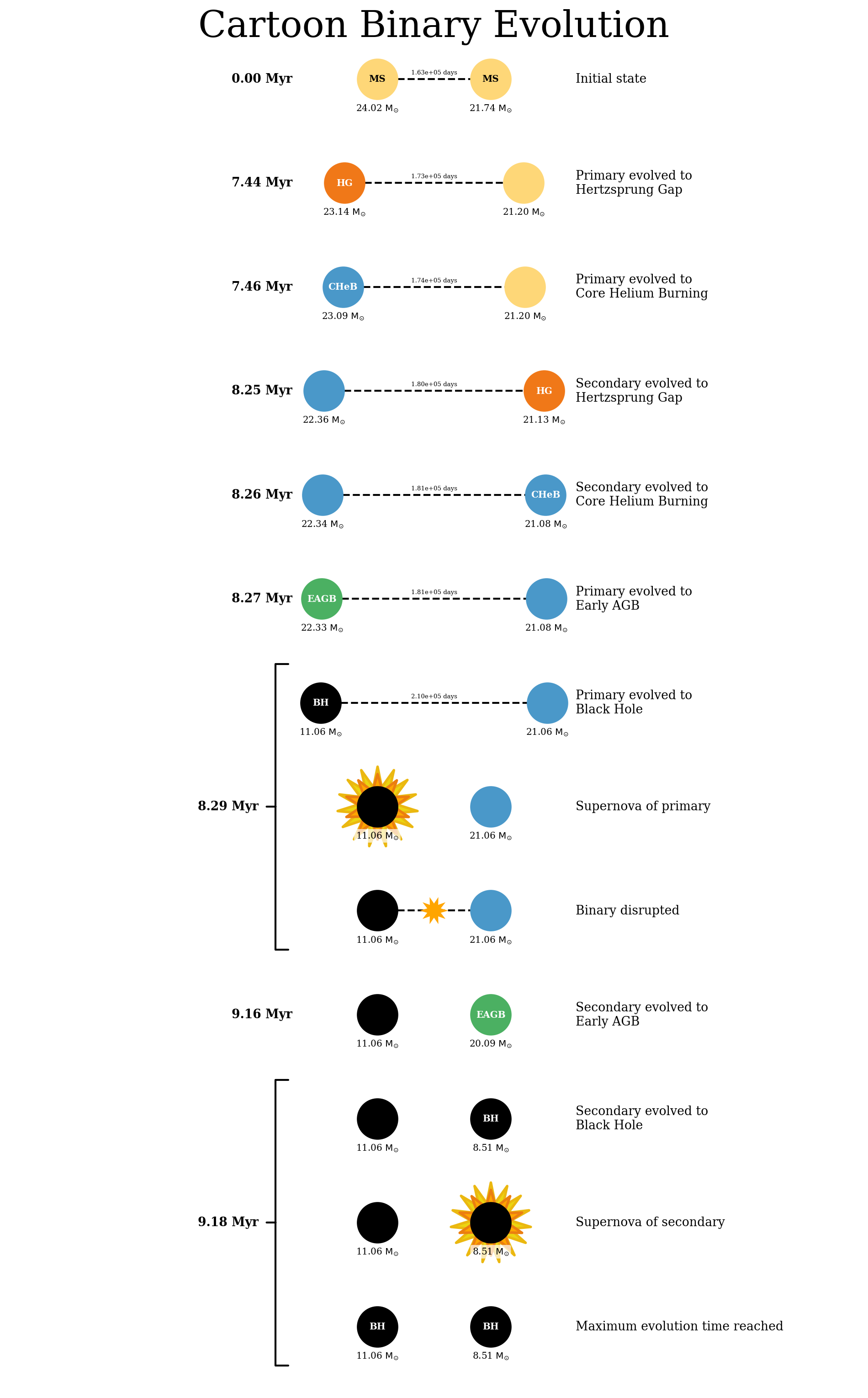
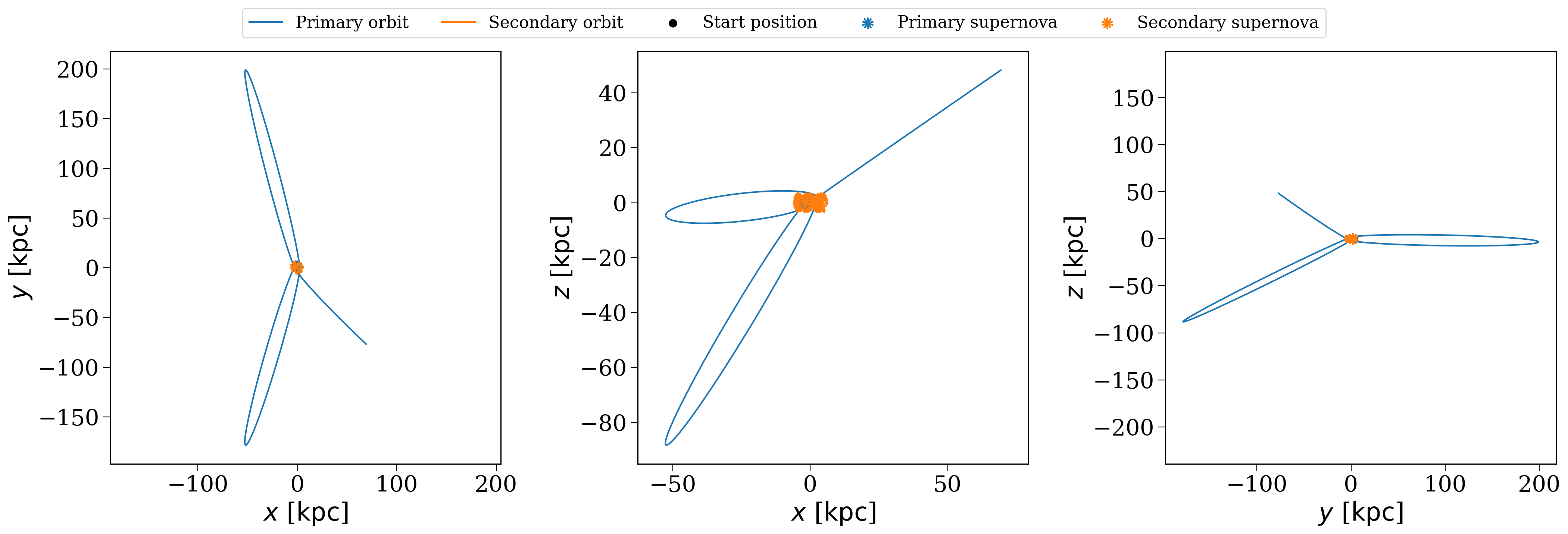
# plot the evolution and orbit of the first binary
p.plot_cartoon_binary(p.bin_nums[0]);
p.plot_orbit(p.bin_nums[0]);
Change COMPAS settings#
You will have noticed above that the COMPASPopulation object takes a number of arguments that allow you to change the settings used by COMPAS. These are:
n_binaries: The number of binaries to simulateconfig_file: The path to aCOMPASconfiguration file to use (by default it will use the one shipped withcogsworth)logfile_definitions: The path to aCOMPASlogfile definitions file to use (by default it will use the one shipped withcogsworth)output_directory: The directory where theCOMPASoutput files will be saved
We can create our own config_file to change some of the settings used by COMPAS.
First, let’s download the default COMPAS config file from their GitHub repository.
[7]:
COMPAS_DEFAULT_CONFIG_URL = "https://raw.githubusercontent.com/TeamCOMPAS/COMPAS/refs/heads/dev/compas_python_utils/preprocessing/compasConfigDefault.yaml"
!wget {COMPAS_DEFAULT_CONFIG_URL} -O compas_config.yaml
--2026-02-02 18:06:25--  https://raw.githubusercontent.com/TeamCOMPAS/COMPAS/refs/heads/dev/compas_python_utils/preprocessing/compasConfigDefault.yaml
Resolving raw.githubusercontent.com (raw.githubusercontent.com)... 185.199.111.133, 185.199.108.133, 185.199.109.133, ...
Connecting to raw.githubusercontent.com (raw.githubusercontent.com)|185.199.111.133|:443... connected.
HTTP request sent, awaiting response... 200 OK
Length: 47542 (46K) [text/plain]
Saving to: ‘compas_config.yaml’

compas_config.yaml  100%[===================>]  46.43K  --.-KB/s    in 0.001s

2026-02-02 18:06:25 (39.8 MB/s) - ‘compas_config.yaml’ saved [47542/47542]
Now we can change some of those settings, let’s try turning stellar winds to a much older prescription by setting
--mass-loss-prescription: 'HURLEY'
Warning
Some settings are required for use with cogsworth!
In order to get an accurate bpp table from the COMPAS output, you must set --switch-log to True in your configuration file. You probably also want to use --evolve-unbound-systems as True to make sure you continue the stellar evolution after a disruption.
Now we can repeat our creation of the COMPASPopulation object with our new configuration file, but copy the initial binaries and initial galaxy from the previous run to make sure we are comparing identical initial populations.
[8]:
hurley_winds = cogsworth.COMPASPopulation(
    n_binaries=len(p),
    config_file='compas_config.yaml',
    logfile_definitions=None,
    output_directory='./COMPAS_Output_hurley_winds',
    final_kstar1=[13, 14],
)
hurley_winds._initial_binaries = p._initial_binaries.copy()
hurley_winds._initial_galaxy = p.initial_galaxy[:]
hurley_winds.perform_stellar_evolution()
hurley_winds.perform_galactic_evolution()
108it [00:00, 929.94it/s]
Now we can take the most massive initial binary star (where winds are important) and compare the binary evolution across the two runs for the same binary
[9]:
most_massive = p.bin_nums[p.initial_binaries["mass_1"].argmax()]
[10]:
p.bpp.loc[most_massive]
[10]:
| tphys | mass_1 | mass_2 | kstar_1 | kstar_2 | sep | ecc | rad_1 | rad_2 | bin_num | evol_type | RRLO_1 | RRLO_2 | porb | |
|---|---|---|---|---|---|---|---|---|---|---|---|---|---|---|
| 96 | 0.000000 | 58.532041 | 38.192146 | 1 | 1 | 18461.396587 | 0.030314 | 9.605389 | 7.443219 | 96 | 1 | 1.518579e-03 | 9.683532e-04 | 29544.224755 |
| 96 | 4.293896 | 50.578618 | 36.182795 | 2 | 1 | 20581.310343 | 0.030314 | 28.761856 | 13.774102 | 96 | 2 | 3.989142e-03 | 1.639439e-03 | 36718.889436 |
| 96 | 4.297866 | 19.567337 | 36.179806 | 7 | 1 | 32031.481222 | 0.030314 | 1.412270 | 13.790766 | 96 | 2 | 1.018207e-04 | 1.316009e-03 | 88940.084735 |
| 96 | 4.749850 | 16.282730 | 35.833516 | 8 | 1 | 34263.088751 | 0.030314 | 1.262747 | 16.483610 | 96 | 2 | 8.216884e-05 | 1.536435e-03 | 101764.550145 |
| 96 | 4.755994 | 16.143548 | 35.828816 | 14 | 1 | 34291.963093 | 0.030314 | 0.000068 | 16.532650 | 96 | 2 | 4.442848e-09 | 1.543025e-03 | 102034.161872 |
| 96 | 4.755994 | 16.143548 | 35.827699 | 14 | 1 | 34370.235012 | 0.032186 | 0.000068 | 16.532221 | 96 | 15 | 4.432757e-09 | 1.539459e-03 | 102384.802523 |
| 96 | 5.467048 | 16.143548 | 35.347952 | 14 | 2 | 34690.463062 | 0.032186 | 0.000068 | 20.036134 | 96 | 2 | 4.403607e-09 | 1.842185e-03 | 104301.532026 |
| 96 | 5.473791 | 16.143548 | 35.297624 | 14 | 4 | 34724.403175 | 0.032186 | 0.000068 | 812.811518 | 96 | 2 | 4.400549e-09 | 7.463236e-02 | 104505.722875 |
| 96 | 6.044947 | 16.143548 | 35.231830 | 14 | 5 | 34768.872783 | 0.032186 | 0.000068 | 964.511468 | 96 | 2 | 4.396552e-09 | 8.840625e-02 | 104773.563579 |
| 96 | 6.057153 | 16.143548 | 14.810516 | 14 | 14 | 57521.102596 | 0.032186 | 0.000068 | 0.000063 | 96 | 2 | 3.203301e-09 | 2.825320e-09 | 287227.012993 |
| 96 | 6.057153 | 16.143548 | 14.810516 | 14 | 14 | 57709.826479 | 0.032614 | 0.000068 | 0.000063 | 96 | 16 | 3.192825e-09 | 2.816080e-09 | 288641.738182 |
| 96 | 6.057153 | 16.143548 | 14.810516 | 14 | 14 | 57709.826479 | 0.032614 | 0.000068 | 0.000063 | 96 | 10 | 3.192825e-09 | 2.816080e-09 | 288641.738182 |
[11]:
hurley_winds.bpp.loc[most_massive]
[11]:
| tphys | mass_1 | mass_2 | kstar_1 | kstar_2 | sep | ecc | rad_1 | rad_2 | bin_num | evol_type | RRLO_1 | RRLO_2 | porb | |
|---|---|---|---|---|---|---|---|---|---|---|---|---|---|---|
| 96 | 0.000000 | 58.532041 | 38.192146 | 1 | 1 | 18461.396587 | 0.030314 | 9.605389 | 7.443219 | 96 | 1 | 1.518579e-03 | 9.683532e-04 | 29544.224755 |
| 96 | 4.755994 | 16.243548 | 35.827699 | 14 | 1 | 34300.213297 | 0.030314 | 0.000069 | 16.532221 | 96 | 15 | 4.474799e-09 | 1.540178e-03 | 101974.023468 |
| 96 | 6.057153 | 16.243548 | 14.873912 | 14 | 14 | 57398.903154 | 0.030437 | 0.000069 | 0.000063 | 96 | 16 | 3.231429e-09 | 2.842234e-09 | 285559.515438 |
| 96 | 6.057153 | 16.243548 | 14.873912 | 14 | 14 | 57398.903154 | 0.030437 | 0.000069 | 0.000063 | 96 | 10 | 3.231429e-09 | 2.842234e-09 | 285559.515438 |
As you can see, the evolution is very different with the different wind prescription!
Use a pre-run COMPAS simulation#
Often you may have already run a COMPAS simulation and want to use cogsworth to perform the galactic evolution and post-processing. This is easy to do with the COMPASPopulation object. You just need to provide the path to the COMPAS output directory with a specific method from the COMPASPopulation class. Here’s how to do that.
Let’s try:
Running a simulation without galactic evolution
Loading it back into a different object
Running the galactic evolution
[12]:
to_file = cogsworth.COMPASPopulation(
    n_binaries=100,
    final_kstar1=[13, 14],
    output_directory="./COMPAS_Output_IO",
)
to_file.sample_initial_binaries()
to_file.perform_stellar_evolution()
[13]:
from_file = cogsworth.COMPASPopulation.from_COMPAS_output("./COMPAS_Output_IO/COMPAS_Output.h5")
from_file
[13]:
<COMPASPopulation - 111 systems - galactic_potential=MilkyWayPotential, SFH=Wagg2022>
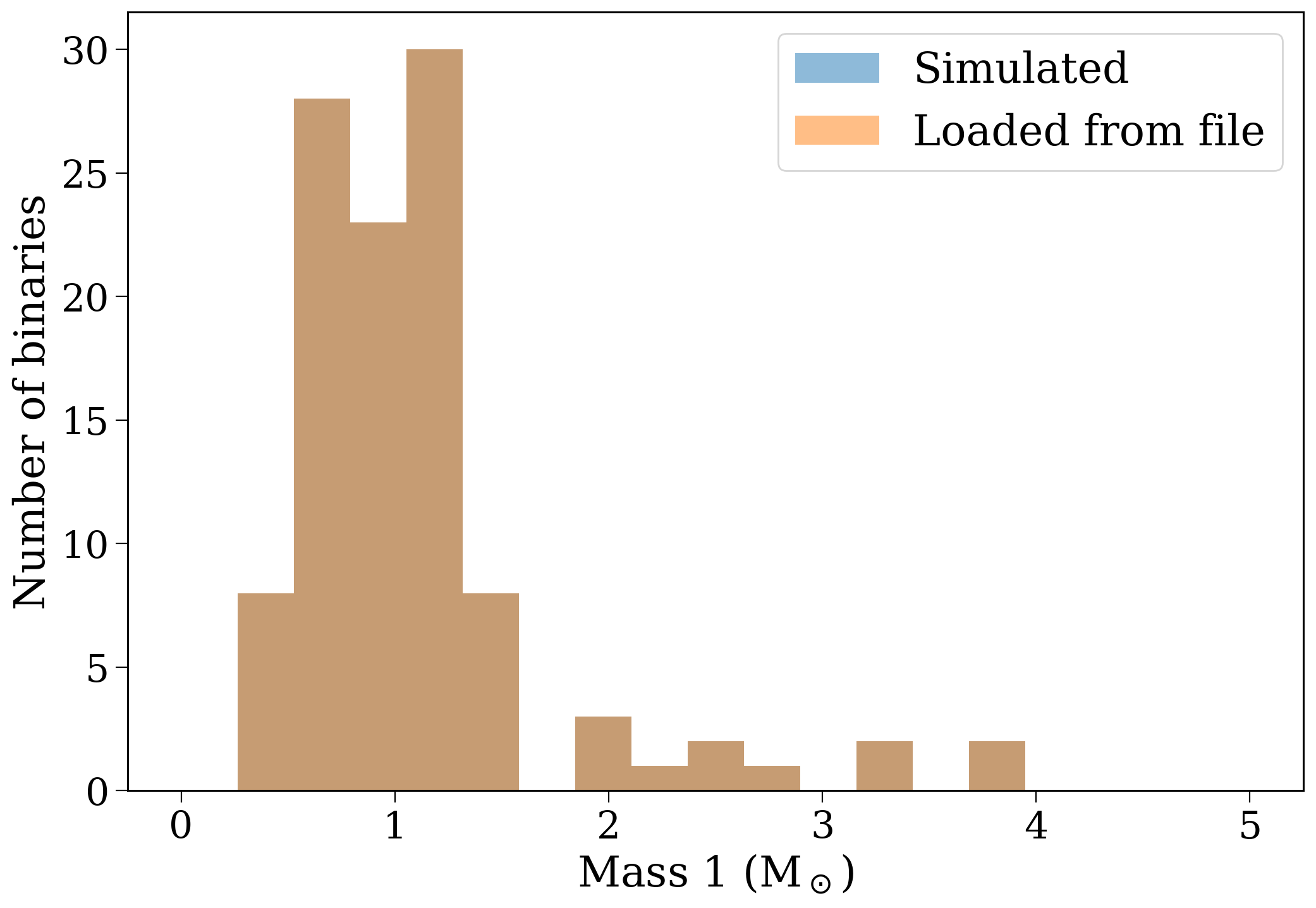
This loaded population can be demonstrated to be identical to the one that we ran it from:
[14]:
fig, ax = plt.subplots()

ax.hist(to_file.final_bpp["mass_1"], bins=np.linspace(0, 5, 20), alpha=0.5, label='Simulated')
ax.hist(from_file.final_bpp["mass_1"], bins=np.linspace(0, 5, 20), alpha=0.5, label='Loaded from file')

ax.set(
    xlabel='Mass 1 (M$_\odot$)',
    ylabel='Number of binaries',
)

ax.legend()
plt.show()
Plus now we can do the galactic evolution for this evolved population.
[16]:
from_file.perform_galactic_evolution()
122it [00:00, 1290.90it/s]
Convert between COSMIC and COMPAS populations#
You can easily convert between Population and COMPASPopulation objects using the provided methods. Here’s how to do that.
First, let’s convert our evolved COMPASPopulation object to a Population object.
[19]:
cosmic_p = p.to_Population()
cosmic_p
[19]:
<Population - 101 evolved systems - galactic_potential=MilkyWayPotential, sfh_model=Wagg2022>
Now let’s redo the stellar evolution and galactic orbit integration and see how things change!
[ ]:
cosmic_p.perform_stellar_evolution()
cosmic_p.perform_galactic_evolution()
109it [00:00, 1138.93it/s]
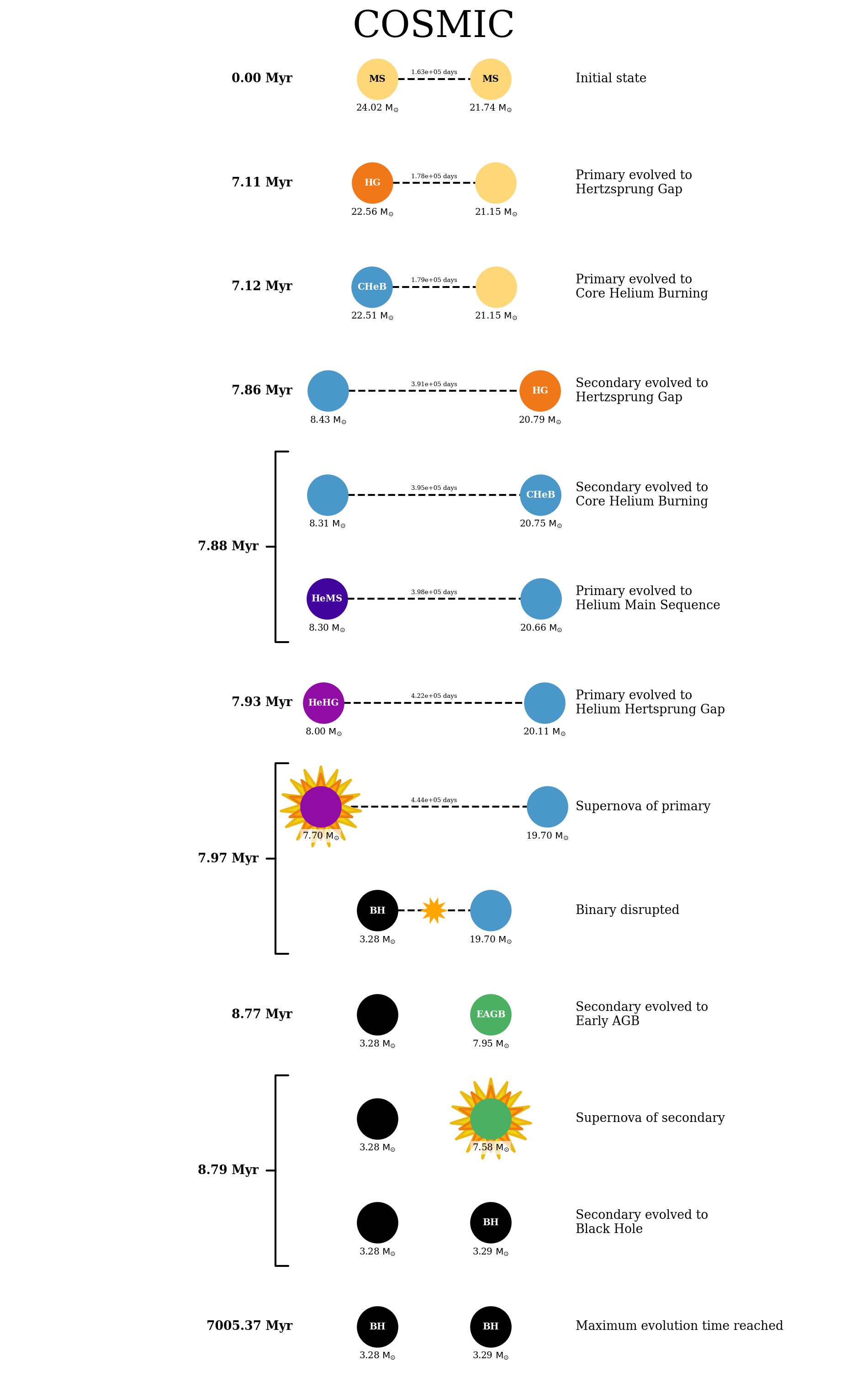
[23]:
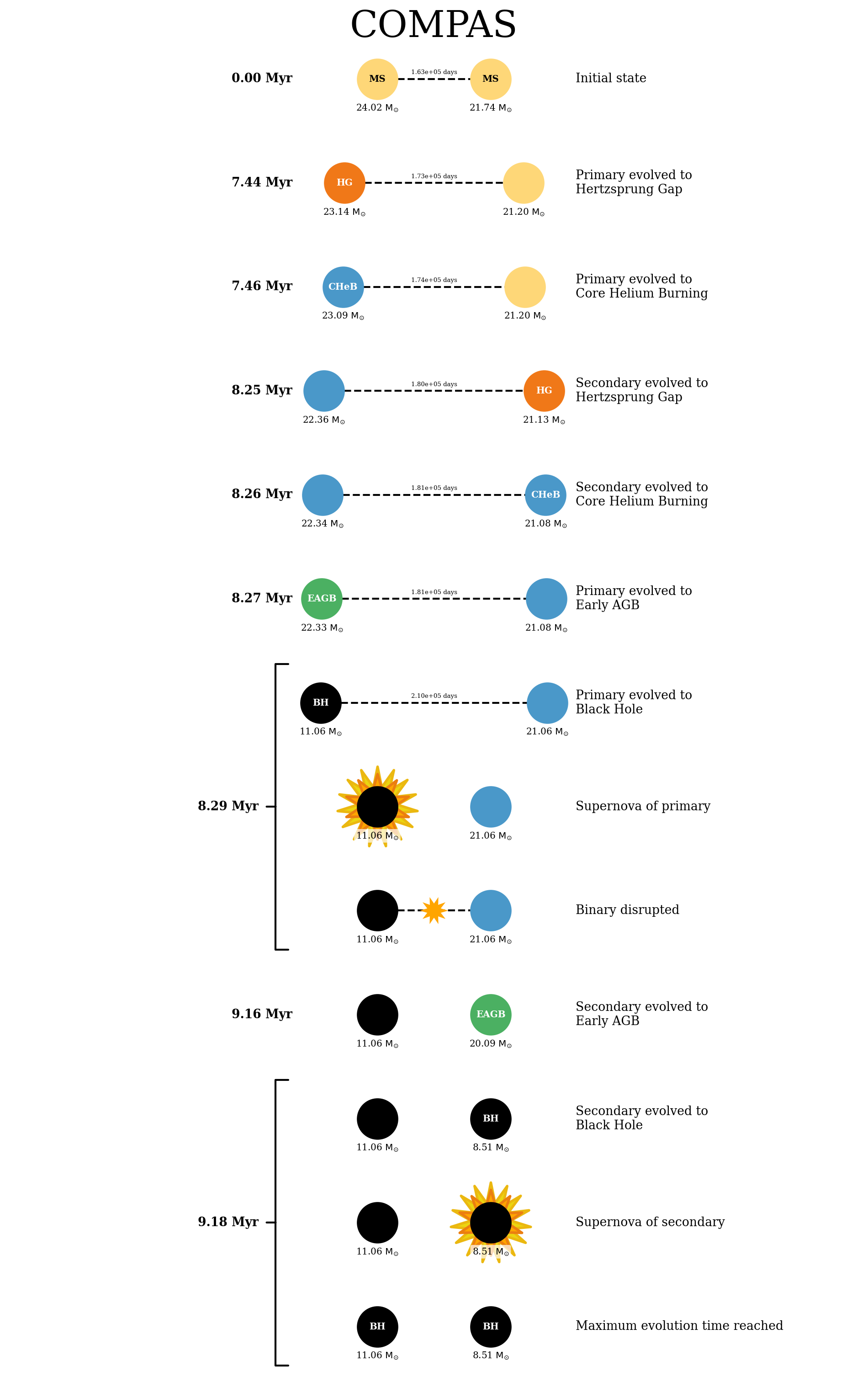
cosmic_p.plot_cartoon_binary(cosmic_p.bin_nums[0], plot_title="COSMIC");
p.plot_cartoon_binary(cosmic_p.bin_nums[0], plot_title="COMPAS");
[25]:
cosmic_p.plot_orbit(cosmic_p.bin_nums[0]);
p.plot_orbit(cosmic_p.bin_nums[0]);
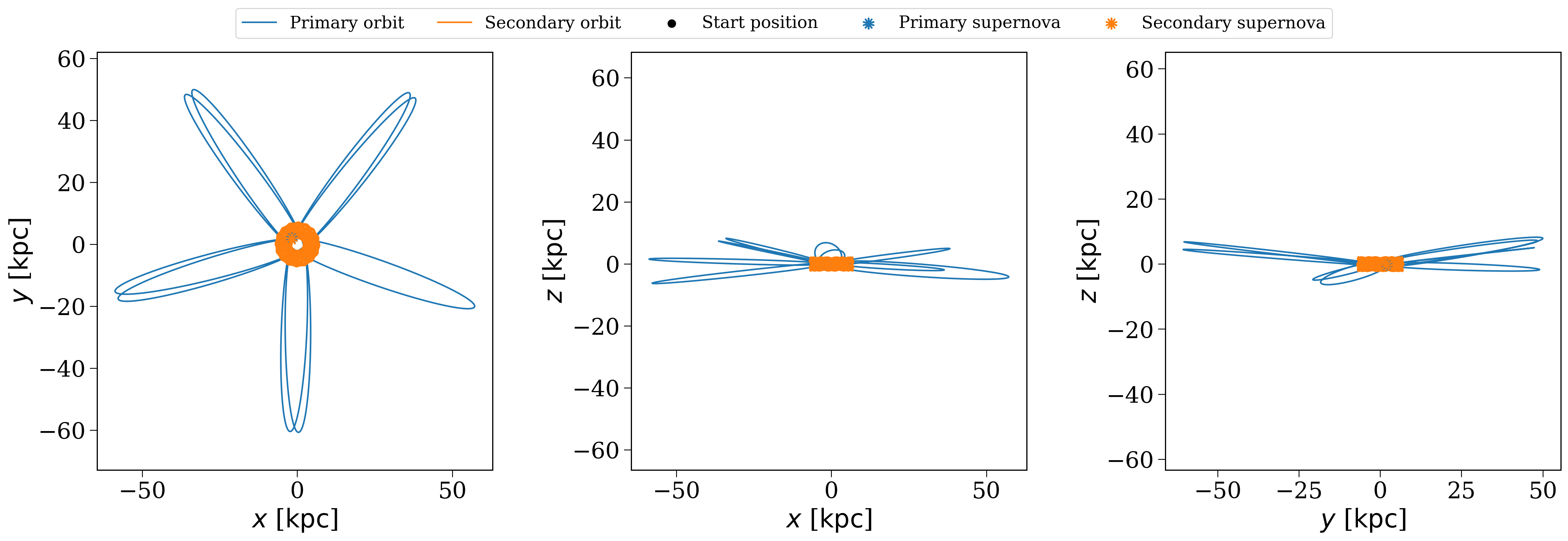
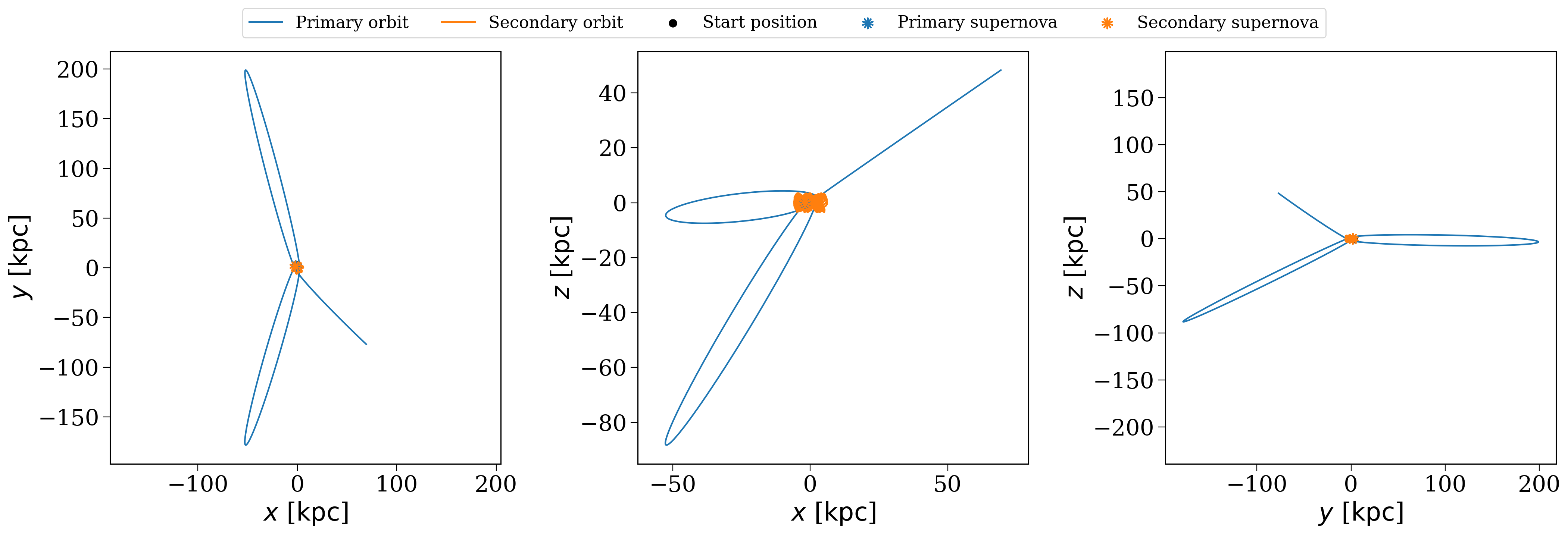
As is probably evident (these are randomly generated each time I build the docs, so not for sure), COMPAS and COSMIC give different results for the same inputs!
You can also do the opposite and convert a COSMIC population back to a COMPAS one.
[24]:
compas_from_cosmic = cosmic_p.to_COMPASPopulation()
compas_from_cosmic
[24]:
<COMPASPopulation - 101 evolved systems - galactic_potential=MilkyWayPotential, sfh_model=Wagg2022>
Wrap-up#
And that’s a wrap! You’ve now learned how to use cogsworth with COMPAS for binary population synthesis. You should now be able to set up your own COMPASPopulation objects, run simulations, and convert between Population and COMPASPopulation objects. Happy simulating!
Note
This tutorial was generated from a Jupyter notebook that can be found here.